
Mauritius Hiker - ASP.NET MVC, ASP.NET web api, C#,

Hiking as a sport is common in several countries, in Mauritius this trend has started to because popular due to the fact that organizer can post hiking events on social networks like Facebook, meetup and others. For some people hiking is not just a sport but a lifestyle as well. When an hiking event is organized people have the chance to meet new people, explore new landscape, boost their adrenaline rush and  at the end of the day add it as unforgettable memories
The fact the we do not have a specific platform custom made for Mauritians hikers, I have developed a web based application that will help organizers to post hiking events, where individual can get in touch with organizers and perform other functionalities.

Screen Shot


User Friendly Application

Simple user interface to make the user comfortable and at ease, with a beautiful and eye catching navigation menu with option like about us, contact us, drop down menu to group all functionalities such as login and registration.


Login and Registration

Login in Mauritius Hikers is easy and fast and it's an email based authentication and also note that user password is MD 5 encrypted 


Home Page

After login the user will be redirected in the home page with all the events posted by organizers and will be sorted by the latest event. Users can contact the event organizer or click on the details button to view more details about a particular event.
Click on the interested button to confirm you participation in an event. All event that a user is interested will change label from "Interested" to  "Going"


Click on the "Details" button to view more information about a particular event.


Contact Organizer

Any question about an event or have any doubt in your mind, you have the option to contact the organizer of the event and ask them any question that you want to. The organizer will receive the message as a notification and and view it in the inbox section


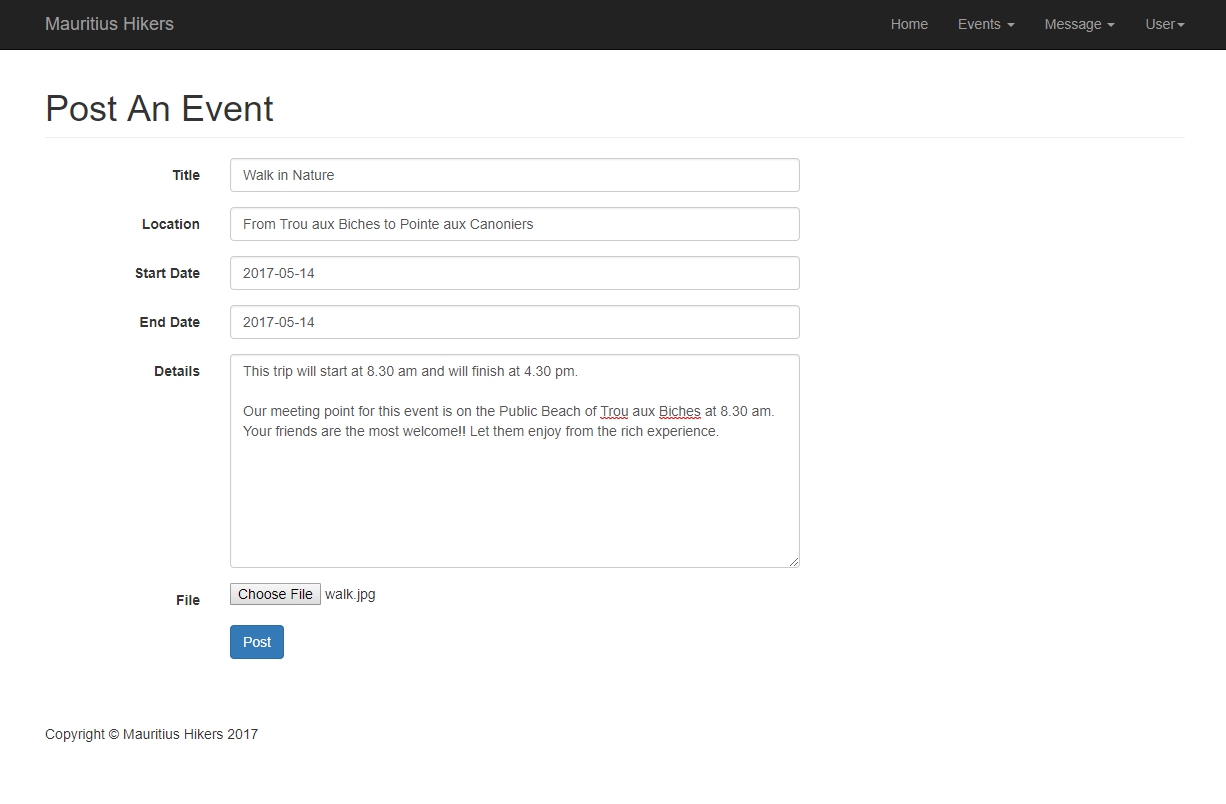
Post An Event

View Posted Events

An organizer can view and delete a post in the section "View my post"


Credit and inspiration : The Adventure Club(TAC), SBASJ

Please donate and support at https://www.paypal.me/Rajcoomar

Comments

Popular posts from this blog

Car Wash System vb.net

This software consists of a database that save the registration number of every vehicle being wash along side with the date, type of wash made and price Screen Shot Source Code To view records in the database: Dim conn As OleDbConnection = New OleDbConnection("Provider=Microsoft.ACE.OLEDB.12.0;Data Source=|DataDirectory|\washRcd.accdb;Persist Security Info=False") Dim sql As String sql = " SELECT * FROM tblwash" conn.Open() Dim dt As New DataTable Dim cmd2 As New OleDb.OleDbDataAdapter(sql, conn) cmd2.Fill(dt) DataGridView1.DataSource = dt DataGridView1.Refresh() conn.Close() To insert new record in the database: Private Sub insert() Dim conn As OleDbConnection = New OleDbConnection("Provider=Microsoft.ACE.OLEDB.12.0;Data Source=|DataDirectory|\washRcd.accdb;Persist Security Info=False") Dim updateSql As String = String.Format(...

Face recognition using EmguCV 3.0 and typing pattern recognition

Introduction An MSc project with the title Student Examination System, where the objective is to put the students in an examination condition but instead of having an invigilator in an examination center, the system will cater for the proper ongoing of the exam. the system can be used as an online examination system The system is able to: Recognizing the face shape of a particular student Detect if there is more than one person in the examination room  Analyze the typing pattern of a student and detect if any one person is taking part in the exam voice recognition for the student and detect if there is more than one person speaking in the examination room Setup Download Emgu CV from  http://www.emgu.com/wiki/index.php/Main_Page Download Haarcascade from  https://github.com/opencv/opencv/tree/master/data/haarcascades Create an account at  https://www.keytrac.net/ Face recognition The snippet below illustrates how the Emgu CV is loaded whe...

Google reCAPTCHA implementation - ASP.NET C#, ASP.NET Web API, Android

Google reCAPTCHA implementation ASP.NET C# Steps to implement Google reCAPTCHA in your website using technologies such as ASP.NET C#, ASP.NET web API, HTML and javascript. First you need to use your google account to login to Google reCAPTCHA  to register a new site. Add a label of your choice in the label section and for web implementation select the reCAPTCHA V2 radio button. Next in the domain section you can add several domains, for testing purposes you can add localhost also followed by another domain in the next line. Accept the terms and conditions and click on the button register. After you click register, google will generate a site key and a secret key and  instructions how to integrate it on both client and server side. Create ASP.NET Web API Next step is to open Microsoft Visual Studio and create a new project by selecting File > New from the menu bar and then select Project.  Select ASP.NET Web Application(.NET Framework) in the p...